PUBLIC INDEX legacy zcourts.com ZCOURTS - VOL. 02
LONDON - 2026
Building RPMs on Windows
I finally got tired of build RPMs in a VM. Its ridiculously slow because its done on a shared Windows partition. I started looking around to see if it was possible, all indications where that it hasn't really been done.....
Static article
Imported body
Legacy aliases
Article archive
FIG. 02
notes
surface
research
surface
Article
app model
publish
surface
Imported writing rendered as native Fission Markdown content.
SECTION
Source and context.
The static release keeps the original post body locally while the backend content pipeline is still being built.
legacy
archive
cygwin
jrpm
maven
redline-rpm
rpm
rpm-maven-plugin
rpmbuild
sed
windows
windows-7
operating-systems
Published 2012-09-11 on legacy zcourts.com. Estimated reading time: 2 min.
Original routes are preserved as local aliases so older links keep resolving to this static archive.
I finally got tired of build RPMs in a VM. Its ridiculously slow because its done on a shared Windows partition.
I started looking around to see if it was possible, all indications where that it hasn't really been done...
I found a few Java libraries that allows you to manipulate RPM files but using them would require writing a maven plugin before I can get anything done...** **Have a look at http://jrpm.sourceforge.net/ and http://redline-rpm.org/ to see what if they're useful for you...
<!-- more -->Using maven I've configured the Maven RPM plugin (see [http://mojo.codehaus.org/rpm-maven-plugin/](http://mojo.codehaus.org/rpm-maven-plugin/)) to generate an RPM from my project. I'll include the POM section for that in a while. To get started however you need Cygwin installed...
Visit http://cygwin.com/ , download and install setup.exe. On the screen which asks you to select packages to be installed search for "RPM"
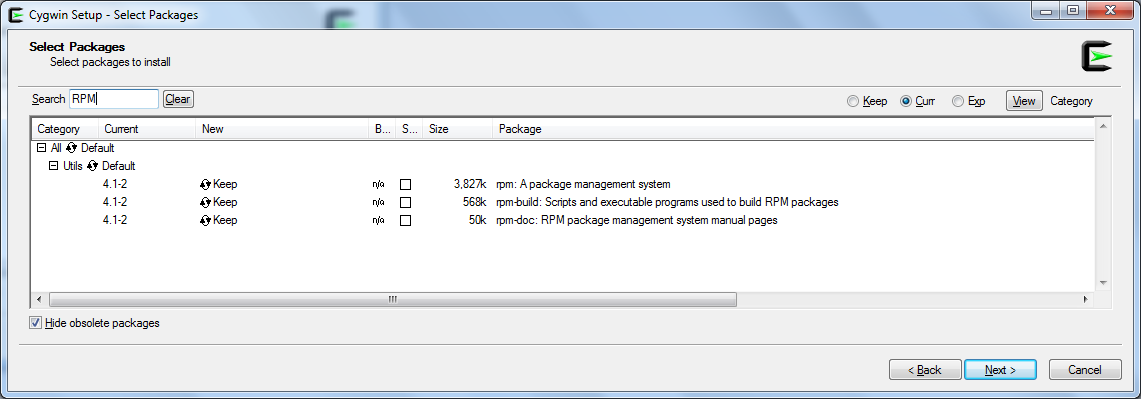
Install the three packages as shown above in the screenshot, rpm,rpmbuild and optionally rpm-doc.
Also ensure the packages libintl2 and sed are selected for installation.
If you already have Cygwin installed then just re-run setup.exe and add the packages above as necessary.
The next thing to do is identify your cygwin bin directory. For example, I installed Cygwin in "C:\bin\cygwin**" **So my cygwin bin directory is "C:\bin\cygwin\bin".
Add this directory to the system path. (Start -> Right click "Computer" ->Properties -> Advanced System settings -> Environment variables and under "System paths", append the directory to the "Path" variable.)
In that folder create a file called **rpmbuild.bat **and add the following contents to that file:
SETLOCAL
PUSHD .

REM Update buildroot path
FOR /F "tokens=*" %%i in ('cygpath %3') do SET NEW_BUILDROOT=%%i

REM Update topdir path
SET TOPDIR=%5
SET TOPDIR=%TOPDIR:~9,-1%
FOR /F "tokens=*" %%i in ('cygpath "%TOPDIR%"') do SET NEW_TOPDIR=%%i

REM Replace path in spec-file
SET OLD_PATH=%TOPDIR:\=\\%
SET NEW_PATH=%NEW_TOPDIR:/=\/%

REM Original sed command
REM sed -s -i -e s/%OLD_PATH%\\/%NEW_PATH%\//g %8

REM replace \ with / i.e. escape \\ replace with escape \/
sed -s -i -e s/\\/\//g %8

REM Execute rpmbuild

bash -c "rpmbuild %1 %2 %NEW_BUILDROOT% %4 ""_topdir %NEW_TOPDIR%"" %6 "%7" --define ""_build_name_fmt %%{ARCH}/%%{NAME}-%%{VERSION}-%%{RELEASE}.%%{ARCH}.rpm"" %8"

POPD
ENDLOCAL
NOTE: I didn't write it, I found it when I ran into issues trying to get my RPM setup to work see https://jira.codehaus.org/browse/MRPM-4 for the original source.
The above script replaces backslashes in the spec file generated with Windows paths.
It then executes the "real rpmbuild" using Cygwin's bash (to provide a linuxish environment)...
This executes fairly quickly and writes the RPM as expected.
SECTION
Related writing.
More imported posts from the current and legacy zcourts archives.
2026-08-24
Keldra: Git at any scale, on your own infrastructure
Git does not need a distributed filesystem or a distributed reimplementation of Git. Keldra stores immutable repository history, publishes it through one exact compare-and-swap, and treats native Git repositories as disposable execution caches.
2026-04-09
Should you write your own database?
We run a data pipeline that ingests very large product snapshots, turns them into downstream feed artifacts, and then keeps those feeds fresh with smaller incremental updates. The pipeline has a weekly "start from a new baseline" phase a...
2026-02-13
AI, Energy, and the Infrastructure Cycle: What Rising Power Bills Tell Us About the Next Economic Phase
For many households in the UK, the story begins not with artificial intelligence, but with a monthly or quarterly energy bill.