PUBLIC INDEX legacy zcourts.com ZCOURTS - VOL. 02
LONDON - 2026
Archimedean Spiral - "Plug a bit of maths in and 'magic' will happen!"
After looking at a few options for placing stuff in an outward spiral I came across the [Archimedean Spiral](en.wikipedia.org/wiki/Archimedean_spiral). I'm rendering my items on an HTML5 canvas so this is all being done ...
Static article
Imported body
Legacy aliases
Article archive
FIG. 02
notes
surface
research
surface
Article
app model
publish
surface
Imported writing rendered as native Fission Markdown content.
SECTION
Source and context.
The static release keeps the original post body locally while the backend content pipeline is still being built.
legacy
archive
archimedean
archimedean-spiral
canvas
drawing
html5
algorithm
math
Published 2011-08-24 on legacy zcourts.com. Estimated reading time: 2 min.
Original routes are preserved as local aliases so older links keep resolving to this static archive.
After looking at a few options for placing stuff in an outward spiral I came across the Archimedean Spiral. I'm rendering my items on an HTML5 canvas so this is all being done in Javascript. After implementing it I started to play around with the values a bit and produced some very interesting effects. Below are two of my favorites...
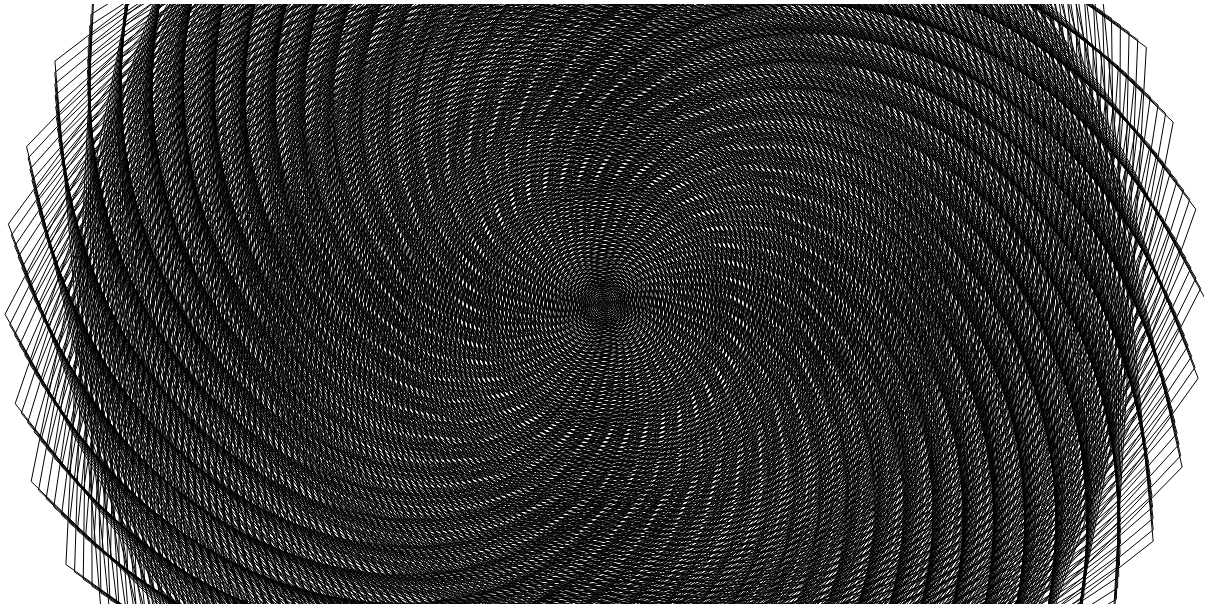
Mind you this is being done with part-finished code so it may not even be a good way of achieving it but it did the trick and I thought I'd post it before the code morphs into something far beyond what's necessary/needed for this.
[image: /assets/legacy/2011-08-24-archimedean-spiral-plug-a-bit-of-maths-in-and-magic-will-happen/archimedean-spiral-right.png]
The little Javascript/HTML snippet that does this is:
![[image: /assets/legacy/2011-08-24-archimedean-spiral-plug-a-bit-of-maths-in-and-magic-will-happen/archimedean-spiral-right.png]](../../assets/legacy/2011-08-24-archimedean-spiral-plug-a-bit-of-maths-in-and-magic-will-happen/archimedean-spiral-right.png)
        <canvas id="tags" width="1200" height="600"></canvas>
        <script type="text/javascript">

            window.onload=function(){
                var c = document.getElementById('tags');
                var context = c.getContext("2d");
                var halfx = context.canvas.width / 2;
                var halfy = context.canvas.height / 2;


                context.clearRect(0, 0, 300, 300);

                context.moveTo(halfx, halfy);
                context.beginPath();
                //check if both the max X and Y edges have been reached
                var Xmaxxed=false,Ymaxxed=false;
                var i=0;
                while(!Xmaxxed||!Ymaxxed){
                    var x = i*0.1 * Math.cos(i);
                    var y = i*0.1 * Math.sin(i);
                    x=x+600;
                    y=y+300;
                    if(x>=c.width){
                        Xmaxxed=true;
                        console.log(["xMaxxed",x,y]);
                    }
                    if(y>=c.height){
                        Ymaxxed=true;
                        console.log(["yMaxxed",x,y]);
                    }
                    console.log(["Attempt "+i,x,y]);
                    context.lineTo(x, y);
                    i+=1;
                }
                context.strokeStyle = "#000";
                context.stroke();

            }
        </script>
Well, that's it, play around with the two lines
var x = i0.1 * Math.cos(i);
var y = i0.1 * Math.sin(i);
and see what effects you can come up with, I'd be interested to see more...
SECTION
Related writing.
More imported posts from the current and legacy zcourts archives.
2026-08-24
Keldra: Git at any scale, on your own infrastructure
Git does not need a distributed filesystem or a distributed reimplementation of Git. Keldra stores immutable repository history, publishes it through one exact compare-and-swap, and treats native Git repositories as disposable execution caches.
2026-04-09
Should you write your own database?
We run a data pipeline that ingests very large product snapshots, turns them into downstream feed artifacts, and then keeps those feeds fresh with smaller incremental updates. The pipeline has a weekly "start from a new baseline" phase a...
2026-02-13
AI, Energy, and the Infrastructure Cycle: What Rising Power Bills Tell Us About the Next Economic Phase
For many households in the UK, the story begins not with artificial intelligence, but with a monthly or quarterly energy bill.